The Endgame Notetaker is only available to select organizations. To enable it for your team, contact support@endgame.io.
An Endgame staff member must activate the Endgame Notetaker for your organization. Coordinate with your Sales Representative to enable this feature. Once enabled, Endgame Notetaker will join any external meetings synced to Endgame. We source team meeting data in a couple of ways: The Notetaker will be very visible when joining your meeting, it generates a transcript of the meeting content. Once complete, Endgame will process that transcript data and associated it to an account making it available to Endgame chat responses.
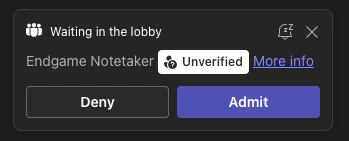
Endgame Notetaker attendee
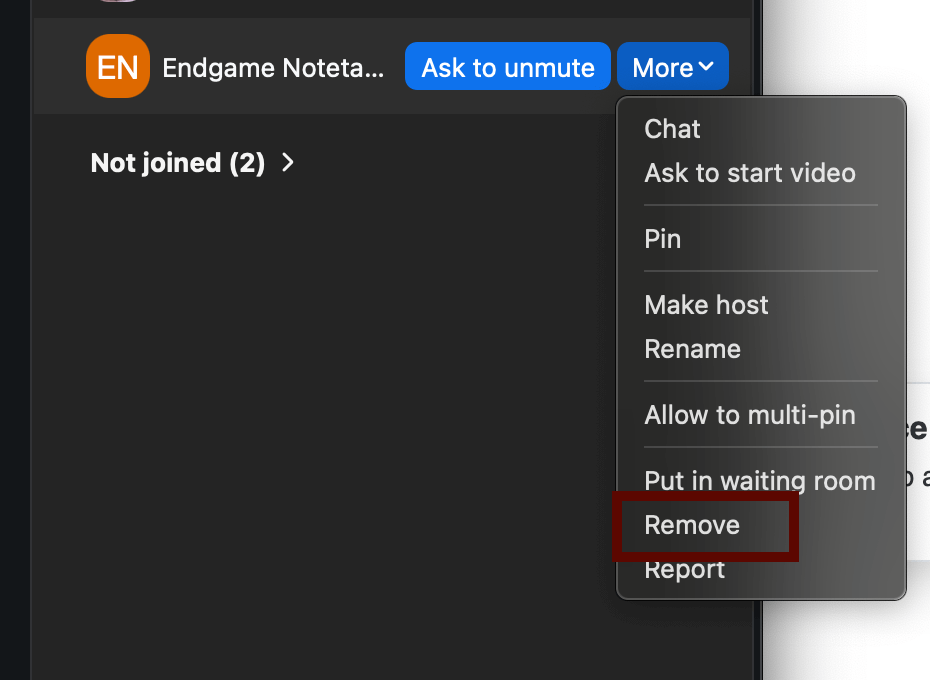
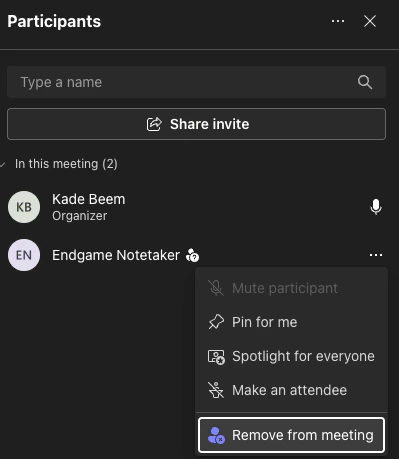
The host of the meeting can remove the Notetaker by navigating to the attendee menu and clicking remove. Please do not report the notetaker as malicious to your meeting operator when removing.
Remove Notetaker Zoom

Endgame Notetaker FAQs

QuestionAnswer
What meetings does the Notetaker join?Once enabled, the Notetaker will automatically join any meeting that is synced to Endgame.
Does the Notetaker join automatically or do I need to invite it to my meetings?The Notetaker joins meetings automatically, there is currently no mechanism for manually adding the Notetaker to a meeting.
What does Endgame do with the transcripts the Notetaker generates?Endgame stores the transcript from your meeting and processes it to extract important facts. These facts are surfaced in chat responses when you ask about meeting activity.
How does the Notetaker know which account to associate my meeting with?We primarily use invitees to associate meetings to accounts and use event title or description as a fallback if needed.
How long does it take for my transcript to be available to Endgame chat?We can usually process and surface transcript data within an hour of meeting completion.
Can I remove the Notetaker from a meeting if I don’t want it recorded?Just like any other unwanted attendee, you can remove the Notetaker from your meeting using the mechanism in your meeting operator of choice.