> ## Documentation Index
> Fetch the complete documentation index at: https://docs.endgame.io/llms.txt
> Use this file to discover all available pages before exploring further.
# Your First 10 Minutes
> Get to your first insight in one session
## Introduction
You've got access to Endgame. Now what?
This guide walks you through the same steps our team covers in live onboarding sessions. By the end, you'll have asked your first question, obtained a real insight, and learned how to get even better answers.
**Time needed:** 10-15 minutes
## Step 1: Set up your profile
*(2 minutes)*
Before you ask anything, help Endgame understand how to talk to you.
The first time you login, you'll be prompted to describe your role. If you skip it, you can click your initials in the bottom left corner, then click **Settings**.
In the **Settings** > **General** > **Personalization** section, fill out the "Describe your role" field. Be specific about what you do day-to-day.
**Examples:**
* "I'm an Enterprise AE focused on new business in financial services. I manage 50 named accounts and need help with research, meeting prep, and deal strategy."
* "I'm a CSM managing 30 mid-market accounts. I focus on renewals, expansion, and making sure customers are getting value."
* "I'm a Sales Manager with 8 AEs. I need to stay on top of deals, coach my team, and prep for forecast calls."
Tell Endgame how you prefer responses. For example:
* "Be concise and use bullet points"
* "Always include next steps I can act on"
* "Avoid jargon and keep it simple"
If you want Endgame to draft emails that sound like you, paste an example of your writing style. This is especially useful for prospecting and follow-up emails.
You can always update these settings later as you learn what works for you.
***
## Step 2: Pick an account you know
*(1 minute)*
For your first question, pick an account you're already familiar with.
Click the Search button (or press `⌘K`) to find the account, then click into the account detail page.
**Your threads are private.** Only you can see your conversations unless you
explicitly share them. Experiment freely.
***
## Step 3: Ask your first question
*(3 minutes)*
Now for the fun part. Below are starter prompts based on your role. Pick one, paste it into the chat, and hit enter.
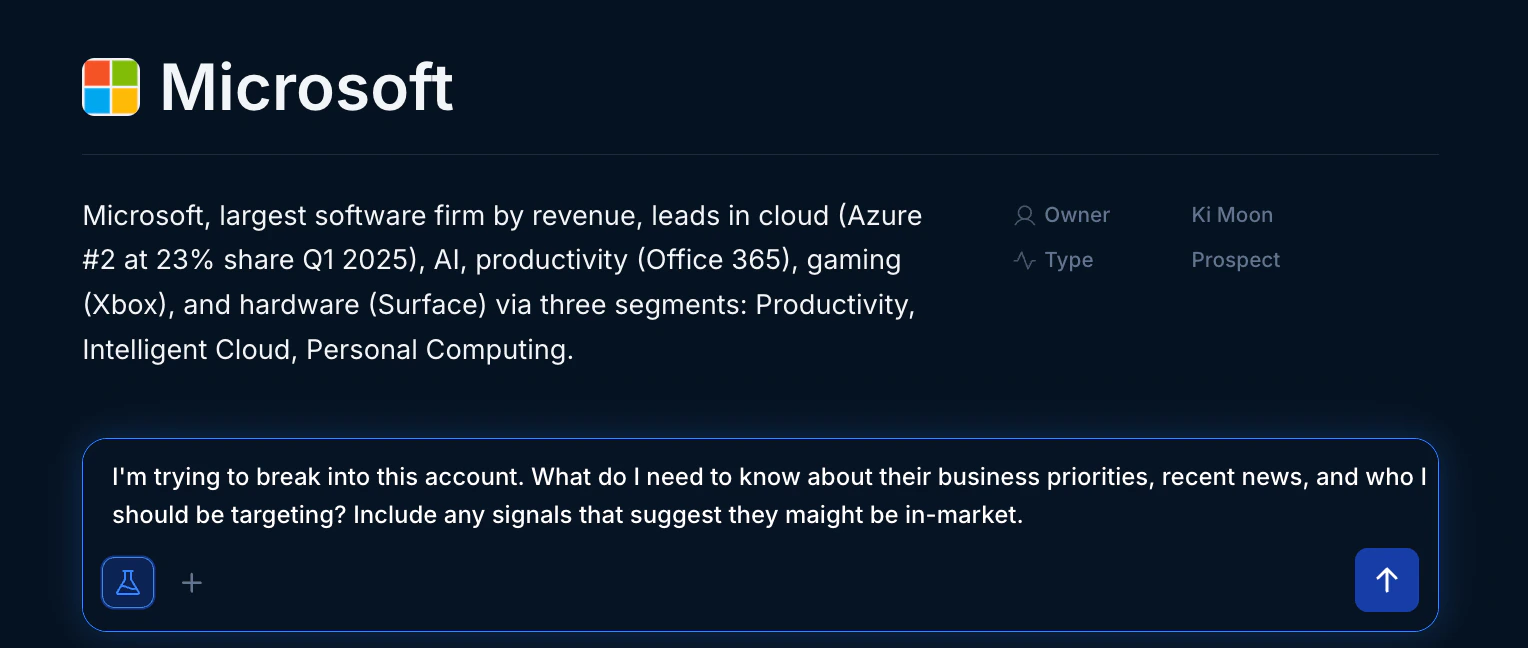 **If you're prospecting into this account:**
```
I'm trying to break into this account. What do I need to know about their business priorities, recent news, and who I should be targeting? Include any signals that suggest they might be in-market.
```
**If you have an active deal:**
```
Give me a quick health check on this account. What's going well, what should I be worried about, and what are the key next steps I should take this week?
```
**If you're prepping for a meeting:**
```
I have a meeting with this account coming up. What should I know going in? Include recent activity, key stakeholders, and any open items from past conversations.
```
**For a renewal coming up:**
```
This account is up for renewal. What's their current sentiment, how engaged have they been, and what risks should I be aware of? Include any expansion opportunities.
```
**For a regular check-in:**
```
Give me a summary of what's been happening with this account over the last 30 days. Include any support issues, engagement patterns, and topics I should bring up in our next call.
```
**For account health:**
```
How healthy is this account? Look at engagement, sentiment from recent calls, and any warning signs. What should I do to strengthen the relationship?
```
**For technical discovery:**
```
What do we know about this account's technical environment? Include any mentions of their tech stack, integration requirements, or technical concerns from past calls.
```
**For demo prep:**
```
I'm doing a demo for this account. What pain points have they mentioned? What use cases should I focus on based on their priorities?
```
**For POC planning:**
```
We're planning a POC with this account. What success criteria have they mentioned? Who are the technical stakeholders I need to keep engaged?
```
**For deal review:**
```
Walk me through this deal from a coaching perspective. What's strong, what's missing from our sales process, and what should the rep focus on next?
```
**For account overview:**
```
I'm getting up to speed on this account. Give me the executive summary: deal status, key relationships, risks, and what I should know before talking to my rep about it.
```
**For meeting prep:**
```
I'm joining a customer call on this account. What context do I need? Include deal history, stakeholder map, and any sensitive topics I should be aware of.
```
**For data quality check:**
```
What do we know about this account that might not be captured in Salesforce? Include insights from calls and emails that could inform our records.
```
**For process analysis:**
```
Walk me through the history of this deal. What stages did it go through, how long did each take, and where did things slow down or speed up?
```
**For competitive intel:**
```
What competitors have come up in conversations with this account? How are we positioned against them?
```
***
## Step 4: Read the response
*(2 minutes)*
Endgame will pull from your CRM, call recordings, emails, and public sources to answer your question. Here's how to get the most out of the response:
**Check the sources.** Click the **Sources** tab to see where the information came from. This helps you verify accuracy and dig deeper if needed.
**Look for surprises.** The most valuable insights are often things you didn't know or had forgotten. Pay attention to recent news, stakeholder changes, or themes from calls.
**Notice what's missing.** If Endgame doesn't mention something you expected, that's useful too. It might mean the information isn't in your systems, or you need to ask a more specific question.
***
## Step 5: Ask a follow-up
*(2 minutes)*
The first answer is just the starting point. Now make it better.
**Go deeper on something specific:**
```
Tell me more about [topic from the response]. What exactly did they say about it?
```
**Get actionable:**
```
Based on this, what are the 3 things I should do this week?
```
**Challenge the response:**
```
Why did you say [X]? What evidence supports that?
```
**Change the format:**
```
Put the key points in a table with stakeholder, their priorities, and last interaction.
```
**Start fresh threads for different topics.** If you switch from account
research to writing an email, start a new thread. Mixing topics in one thread
can confuse the context.
***
## You're up and running
That's it. You've:
* **✅** Set up your profile so Endgame knows how to help you
* ✅ Asked a real question about a real account
* ✅ Learned how to check sources and iterate
### What to try next
Schedule insights delivered to your inbox
Query your entire book from the homepage
Level up with advanced techniques
Rerun your best workflows with one click
***
## Common early questions
This usually comes down to filtering. Endgame might be including or excluding records based on how you asked the question (e.g., "my accounts" vs "all accounts" or "open opportunities" vs "all opportunities").
Try asking: *"Why did you include these accounts? What filters did you apply?"*
Endgame will explain its reasoning, and you can adjust your question to get the view you want.
Endgame connects to your Salesforce, call recordings (Gong/Zoom/Chorus), emails, Slack (if connected), and public sources like LinkedIn and news. The specific fields depend on how your admin configured the integration.
If you're not seeing something you expect, check with your admin about which Salesforce objects and fields are enabled.
No. Your threads are private by default. The only way someone else can see a thread is if you explicitly [Share](https://docs.endgame.io/features/publishing-and-sharing) it. Even then, you can stop sharing at any time.
Start simple and iterate. Ask something basic, see what you get, then refine. You can also ask Endgame directly: *"I'm trying to figure out X. What's the best way to ask you about that?"*
1. As a first step, ask Endgame about the discrepancy. This can help clarify the way the answer was provided.
2. Then try to reframe the question based on the clarification.
3. If the answer is still inaccurate, click the thumbs down icon at the bottom of the response and let us know why.
**If you're prospecting into this account:**
```
I'm trying to break into this account. What do I need to know about their business priorities, recent news, and who I should be targeting? Include any signals that suggest they might be in-market.
```
**If you have an active deal:**
```
Give me a quick health check on this account. What's going well, what should I be worried about, and what are the key next steps I should take this week?
```
**If you're prepping for a meeting:**
```
I have a meeting with this account coming up. What should I know going in? Include recent activity, key stakeholders, and any open items from past conversations.
```
**For a renewal coming up:**
```
This account is up for renewal. What's their current sentiment, how engaged have they been, and what risks should I be aware of? Include any expansion opportunities.
```
**For a regular check-in:**
```
Give me a summary of what's been happening with this account over the last 30 days. Include any support issues, engagement patterns, and topics I should bring up in our next call.
```
**For account health:**
```
How healthy is this account? Look at engagement, sentiment from recent calls, and any warning signs. What should I do to strengthen the relationship?
```
**For technical discovery:**
```
What do we know about this account's technical environment? Include any mentions of their tech stack, integration requirements, or technical concerns from past calls.
```
**For demo prep:**
```
I'm doing a demo for this account. What pain points have they mentioned? What use cases should I focus on based on their priorities?
```
**For POC planning:**
```
We're planning a POC with this account. What success criteria have they mentioned? Who are the technical stakeholders I need to keep engaged?
```
**For deal review:**
```
Walk me through this deal from a coaching perspective. What's strong, what's missing from our sales process, and what should the rep focus on next?
```
**For account overview:**
```
I'm getting up to speed on this account. Give me the executive summary: deal status, key relationships, risks, and what I should know before talking to my rep about it.
```
**For meeting prep:**
```
I'm joining a customer call on this account. What context do I need? Include deal history, stakeholder map, and any sensitive topics I should be aware of.
```
**For data quality check:**
```
What do we know about this account that might not be captured in Salesforce? Include insights from calls and emails that could inform our records.
```
**For process analysis:**
```
Walk me through the history of this deal. What stages did it go through, how long did each take, and where did things slow down or speed up?
```
**For competitive intel:**
```
What competitors have come up in conversations with this account? How are we positioned against them?
```
***
## Step 4: Read the response
*(2 minutes)*
Endgame will pull from your CRM, call recordings, emails, and public sources to answer your question. Here's how to get the most out of the response:
**Check the sources.** Click the **Sources** tab to see where the information came from. This helps you verify accuracy and dig deeper if needed.
**Look for surprises.** The most valuable insights are often things you didn't know or had forgotten. Pay attention to recent news, stakeholder changes, or themes from calls.
**Notice what's missing.** If Endgame doesn't mention something you expected, that's useful too. It might mean the information isn't in your systems, or you need to ask a more specific question.
***
## Step 5: Ask a follow-up
*(2 minutes)*
The first answer is just the starting point. Now make it better.
**Go deeper on something specific:**
```
Tell me more about [topic from the response]. What exactly did they say about it?
```
**Get actionable:**
```
Based on this, what are the 3 things I should do this week?
```
**Challenge the response:**
```
Why did you say [X]? What evidence supports that?
```
**Change the format:**
```
Put the key points in a table with stakeholder, their priorities, and last interaction.
```
**Start fresh threads for different topics.** If you switch from account
research to writing an email, start a new thread. Mixing topics in one thread
can confuse the context.
***
## You're up and running
That's it. You've:
* **✅** Set up your profile so Endgame knows how to help you
* ✅ Asked a real question about a real account
* ✅ Learned how to check sources and iterate
### What to try next
Schedule insights delivered to your inbox
Query your entire book from the homepage
Level up with advanced techniques
Rerun your best workflows with one click
***
## Common early questions
This usually comes down to filtering. Endgame might be including or excluding records based on how you asked the question (e.g., "my accounts" vs "all accounts" or "open opportunities" vs "all opportunities").
Try asking: *"Why did you include these accounts? What filters did you apply?"*
Endgame will explain its reasoning, and you can adjust your question to get the view you want.
Endgame connects to your Salesforce, call recordings (Gong/Zoom/Chorus), emails, Slack (if connected), and public sources like LinkedIn and news. The specific fields depend on how your admin configured the integration.
If you're not seeing something you expect, check with your admin about which Salesforce objects and fields are enabled.
No. Your threads are private by default. The only way someone else can see a thread is if you explicitly [Share](https://docs.endgame.io/features/publishing-and-sharing) it. Even then, you can stop sharing at any time.
Start simple and iterate. Ask something basic, see what you get, then refine. You can also ask Endgame directly: *"I'm trying to figure out X. What's the best way to ask you about that?"*
1. As a first step, ask Endgame about the discrepancy. This can help clarify the way the answer was provided.
2. Then try to reframe the question based on the clarification.
3. If the answer is still inaccurate, click the thumbs down icon at the bottom of the response and let us know why.
 ***
## Need help?
If you get stuck, reach out to [support@endgame.io](mailto:support@endgame.io) or check the [full documentation](/).
***
## Need help?
If you get stuck, reach out to [support@endgame.io](mailto:support@endgame.io) or check the [full documentation](/).