> ## Documentation Index
> Fetch the complete documentation index at: https://docs.endgame.io/llms.txt
> Use this file to discover all available pages before exploring further.
# API Keys
> Create and manage API keys and machine-to-machine credentials for connecting to the Endgame MCP server.
**Deprecation:** The Endgame REST API, including the `/threads` endpoints, has
been deprecated. API keys and machine-to-machine credentials are still
supported for connecting to the [Endgame MCP server](/features/mcp-server).
Use API keys and machine-to-machine (M2M) credentials when an agent or automation needs to connect to the Endgame MCP server without a person signing in, such as a [Claude Managed Agent](/features/mcp-server#connect-via-claude-managed-agents-service-accounts), a scheduled job, or a CI pipeline. If a person is connecting their own AI assistant, they should sign in with their Endgame account instead -- see [Getting started](/features/mcp-server#getting-started).
Credentials are passed as a **Bearer token** in the `Authorization` header on requests to the MCP server:
```http theme={null}
Authorization: Bearer eak_your_api_key_here
```
The Endgame MCP server URL is:
```
https://app.endgame.io/api/v1/mcp
```
Two kinds of credentials are accepted. Both are provisioned from Endgame itself -- you don't need to configure anything in an external identity provider.
| Credential | Where you create it | When to use |
| - | - | - |
| **API key** (`eak_*`) | [Settings → API Keys](https://app.endgame.io/settings/api-keys) | Agents and automations where a long-lived static token is fine. |
| **M2M application** | [Settings → Applications](https://app.endgame.io/settings/applications) | Server-to-server integrations that want short-lived OAuth tokens via the `client_credentials` grant. |
Both are admin-only. Admins can see every API key and application running against Endgame, and how much each one is used, in the **Automations** view of the [Console](/console-observation#automations).
## Create an API key
You must be an admin in your Endgame organization to create API keys. The
number of service account keys your organization can create may be limited.
Sign in to Endgame and open [the API Keys settings page](https://app.endgame.io/settings/api-keys).
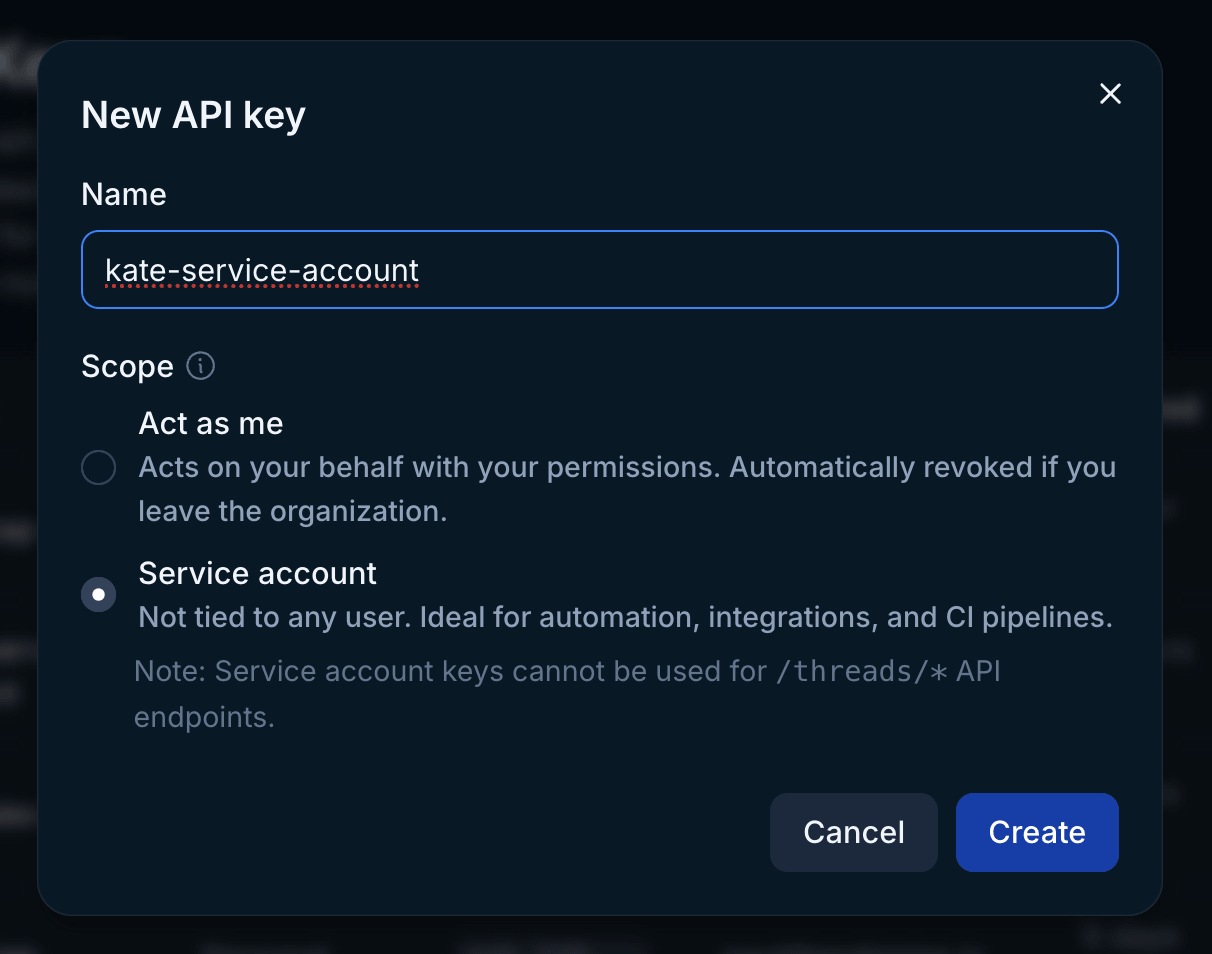
Give the key a descriptive name (e.g. `deal-review-agent-prod`) and pick a scope:
* **Act as me** -- Acts on your behalf with your permissions. Automatically revoked if you leave the organization.
* **Service account** -- Not tied to any user. Ideal for automation, integrations, and CI pipelines.
The full key is shown **only once** on creation -- copy it immediately and store it in a secrets manager. The scope cannot be changed later.
 Add the key as a Bearer token wherever your agent or MCP client is configured, with the server URL set to `https://app.endgame.io/api/v1/mcp`. For a step-by-step example, see [Connect via Claude Managed Agents](/features/mcp-server#connect-via-claude-managed-agents-service-accounts).
## Create a machine-to-machine application
Use an M2M application when you need short-lived tokens issued per request (typical for production server-to-server integrations) rather than a long-lived static key.
You must be an admin in your Endgame organization to create applications.
Sign in to Endgame and open [the Applications settings page](https://app.endgame.io/settings/applications).
Click **New application**, give it a descriptive name, and save. Endgame provisions a WorkOS OAuth client on your behalf and returns a **client ID** and **client secret**. The secret is shown **only once** on creation -- copy it immediately into your secrets manager. You can rotate it later from the same page.
Perform a standard OAuth `client_credentials` grant against WorkOS's token endpoint:
```bash theme={null}
curl -X POST https://login.endgame.io/oauth2/token \
-H "Content-Type: application/x-www-form-urlencoded" \
-d "grant_type=client_credentials" \
-d "client_id=$CLIENT_ID" \
-d "client_secret=$CLIENT_SECRET"
```
The response contains an `access_token` (a JWT). Re-exchange the credentials whenever the token nears its expiration.
Pass the access token as a Bearer token on requests to `https://app.endgame.io/api/v1/mcp`.
## Revoke credentials
**API keys:** revoke from [the API Keys settings page](https://app.endgame.io/settings/api-keys) -- click **Revoke** next to the key's row. **Act as me** keys are **automatically revoked** when the owning user leaves the organization. **Service account** keys persist until explicitly revoked.
**M2M applications:** delete the application (or rotate its secret) from [the Applications settings page](https://app.endgame.io/settings/applications). Deleting the application revokes all access tokens issued under it.
Revocation is immediate in both cases; subsequent requests using a revoked credential fail with `401 UNAUTHORIZED`.
## Security guidance
* Store credentials in a secrets manager. Never commit them to source control.
* Use a separate credential per environment (dev, staging, prod) so rotation is scoped.
* Give each one a descriptive name so revocation decisions are easy to audit.
* Rotate on a regular cadence and whenever a team member with access leaves.
* For shared or automated workflows, prefer **Service account** keys or **M2M applications** over **Act as me** keys, so access doesn't depend on a single person staying in the organization.
## Need help?
For access questions or help with authentication, contact [support@endgame.io](mailto:support@endgame.io).
This documentation is built and hosted on [Mintlify](https://mintlify.com), a developer documentation platform.
Add the key as a Bearer token wherever your agent or MCP client is configured, with the server URL set to `https://app.endgame.io/api/v1/mcp`. For a step-by-step example, see [Connect via Claude Managed Agents](/features/mcp-server#connect-via-claude-managed-agents-service-accounts).
## Create a machine-to-machine application
Use an M2M application when you need short-lived tokens issued per request (typical for production server-to-server integrations) rather than a long-lived static key.
You must be an admin in your Endgame organization to create applications.
Sign in to Endgame and open [the Applications settings page](https://app.endgame.io/settings/applications).
Click **New application**, give it a descriptive name, and save. Endgame provisions a WorkOS OAuth client on your behalf and returns a **client ID** and **client secret**. The secret is shown **only once** on creation -- copy it immediately into your secrets manager. You can rotate it later from the same page.
Perform a standard OAuth `client_credentials` grant against WorkOS's token endpoint:
```bash theme={null}
curl -X POST https://login.endgame.io/oauth2/token \
-H "Content-Type: application/x-www-form-urlencoded" \
-d "grant_type=client_credentials" \
-d "client_id=$CLIENT_ID" \
-d "client_secret=$CLIENT_SECRET"
```
The response contains an `access_token` (a JWT). Re-exchange the credentials whenever the token nears its expiration.
Pass the access token as a Bearer token on requests to `https://app.endgame.io/api/v1/mcp`.
## Revoke credentials
**API keys:** revoke from [the API Keys settings page](https://app.endgame.io/settings/api-keys) -- click **Revoke** next to the key's row. **Act as me** keys are **automatically revoked** when the owning user leaves the organization. **Service account** keys persist until explicitly revoked.
**M2M applications:** delete the application (or rotate its secret) from [the Applications settings page](https://app.endgame.io/settings/applications). Deleting the application revokes all access tokens issued under it.
Revocation is immediate in both cases; subsequent requests using a revoked credential fail with `401 UNAUTHORIZED`.
## Security guidance
* Store credentials in a secrets manager. Never commit them to source control.
* Use a separate credential per environment (dev, staging, prod) so rotation is scoped.
* Give each one a descriptive name so revocation decisions are easy to audit.
* Rotate on a regular cadence and whenever a team member with access leaves.
* For shared or automated workflows, prefer **Service account** keys or **M2M applications** over **Act as me** keys, so access doesn't depend on a single person staying in the organization.
## Need help?
For access questions or help with authentication, contact [support@endgame.io](mailto:support@endgame.io).
This documentation is built and hosted on [Mintlify](https://mintlify.com), a developer documentation platform.